Agent Deck: Your Native macOS Command Center for Pi-Powered Coding Agents

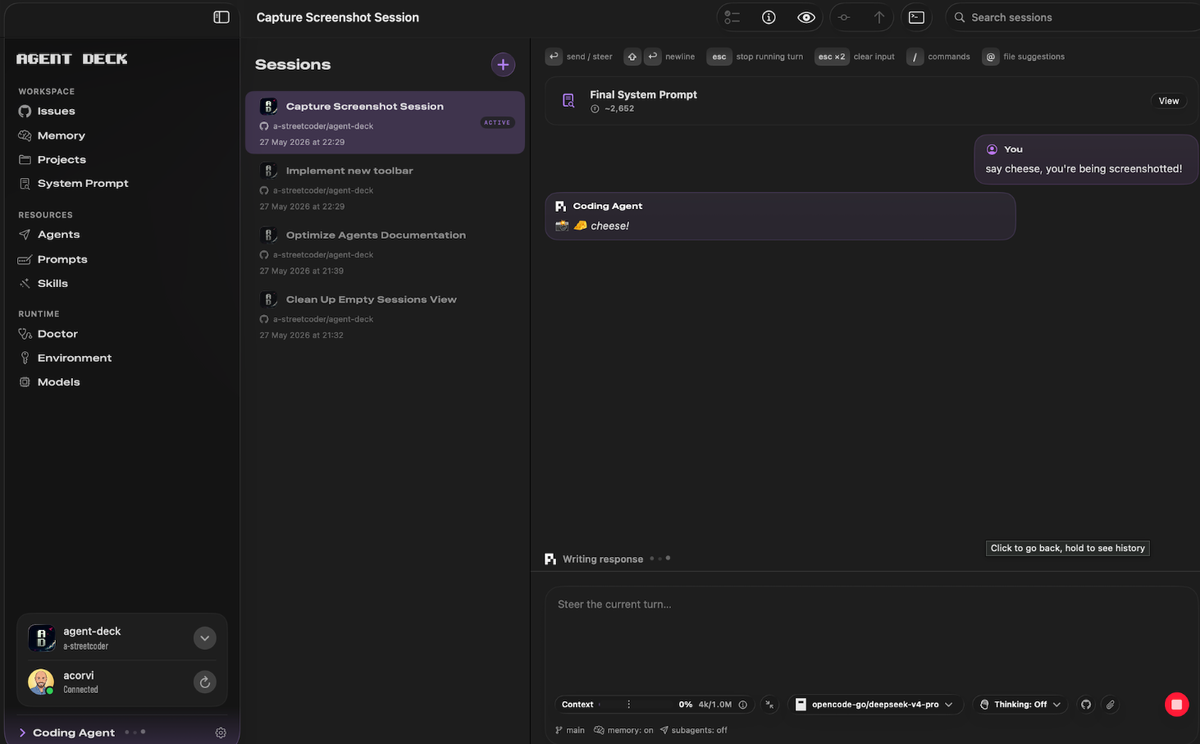
If you're using Pi, the powerful terminal-based coding agent, you already know its value. But let's be real: managing agents, prompts, worktrees, and GitHub contexts across multiple terminal tabs? That's cognitive overhead you don't need.
Enter Agent Deck, the first native macOS workspace built specifically for agentic coding workflows powered by Pi.
What Is Agent Deck?
Agent Deck is a signed, notarized Swift app that turns your installed pi CLI into a seamless, visual macOS experience.
It doesn't replace Pi. It doesn't embed its own AI runtime. Instead, it launches your existing pi CLI in JSONL RPC mode in the background, and gives you a clean, native interface to control everything:
- Manage multiple agents & subagents
- Organize skills, prompts, and commands
- Switch between worktrees & project contexts instantly
- Track GitHub issues, PRs, and repos without leaving the app
- View structured, live output: no more scrolling through terminal history
Think of it as your mission control for agentic development.
Why Developers Love It
No More Context Switching
Rebuilding project context from memory every time you switch terminals? Gone. Agent Deck keeps your agent state, prompts, and workspace scope explicit and persistent.
Built for macOS, By macOS
Native Swift UI. Keyboard shortcuts. Dark mode. Sparkle-powered updates. It feels like it belongs on your Mac, because it does.
Privacy-First & Transparent
Agent Deck runs your locally installed pi CLI. Your code, your keys, your data, never leaves your machine. No cloud proxy. No hidden telemetry.
GitHub-Native Workflow
Link agents to repos, attach context from issues, and push changes—all without copying/pasting between browser and terminal.
How It Works (The Short Version)
- Install Pi CLI via your usual method (
brew install pi, etc.) - Download the latest Agent Deck .dmg from Releases
- Drag to
/Applications→ Launch → Done - Agent Deck auto-detects your
piinstallation and launches it in RPC mode - Start building with agents, not tabs
Updates? Handled natively via Sparkle—you'll get a clean macOS dialog when a new version drops.
Perfect For
- AI-augmented developers who want structure without sacrificing flexibility
- Teams standardizing on Pi for coding agents but needing shared prompt/skill libraries
- macOS power users who value native performance, signed code, and keyboard-driven workflows
- Privacy-conscious builders who prefer local-first AI tooling
⚡ Get Started in 60 Seconds
Agent Deck is free, open, and built in the open. Your feedback shapes what's next.
 a-streetcoder