3 Picks for the Best Presentation Software for DevOps in 2027 (CI-Friendly Tools)


PowerPoint still dominates meetings, yet most engineers treat it like legacy code that never gets refactored. Developer Sergio Florez notes, “If you've ever built a presentation in PowerPoint… you know the manual work: dragging boxes, designing every slide by hand… You can git diff your source code — but not your slides.”
That pain resurfaces each time you paste YAML, try to version-control a slide, or defend a blurry pipeline screenshot. We spent a quarter testing twenty next-gen tools, scoring workflow fit, code fidelity, CI hooks, and Linux support. Three clear winners emerged — and they’re up next.
Why standard slideware trips up DevOps teams
We spend our days scripting pipelines, version-controlling infrastructure, and automating every repeatable task. Then a stakeholder asks for a slide deck and, boom, you’re back to dragging text boxes by hand. The cognitive whiplash is real.
Traditional tools put design first and source control last. A .pptx file appears as one blob to Git, so the slightest text tweak shows up as a binary change. Good luck reviewing that in a pull request. No diffs means no history, no blame, and no confidence that the slide with the firewall rule hasn’t drifted since last quarter’s audit.
Code snippets suffer next. Paste a shell command into PowerPoint and it inherits whatever Calibri-11 styling the template dictates. Syntax highlighting? Only if you screenshot your IDE, turning live text into a static image no one can copy or grep later. Architecture diagrams face the same fate. Export from draw.io, re-import as a JPEG, discover at rehearsal that it’s blurry on the projector. We’ve all been there.
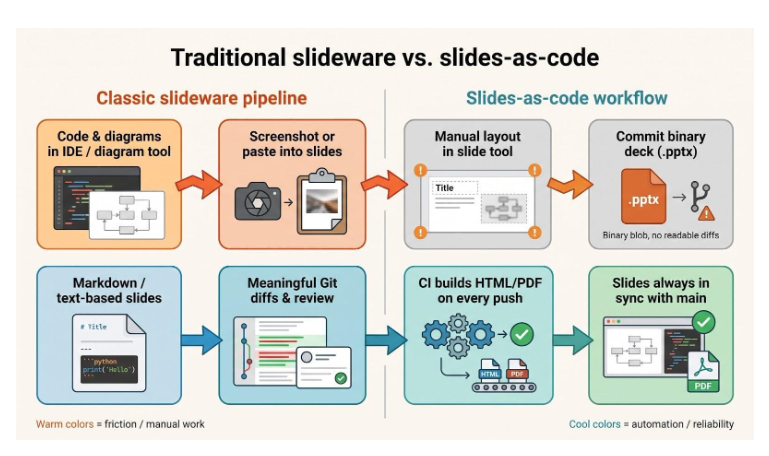
Workflow integration matters too. DevOps culture thrives on repeatability, yet classic slideware demands manual rebuilds. You rename an environment variable, but the weekly review deck doesn’t update until someone remembers to change the label on slide twelve. That tiny mismatch eventually seeds confusion and, worse, distrust.
Security piles on. Many enterprises run hardened Linux desktops or air-gapped networks where SaaS editors can’t pass the proxy. A Windows-only desktop app tied to an O365 login simply isn’t an option for those teams. They need cross-platform binaries, offline exports, and, ideally, open-source code they can audit.
All of this overhead steals hours we’d rather invest in root-cause analysis or pipeline optimizations. The solution isn’t to abandon slides; it’s to adopt tools that treat presentations the way we treat code: as text, version controlled, automatable, and portable across any OS. That mindset drove the evaluation criteria behind our top picks, and it guides the ranking that follows.
How we ranked the field
We didn’t pick the finalists at random. Each candidate faced the same stress test you would run on any build tool: integrate cleanly, handle real data, and stay secure under load.
We began with a shortlist of twenty tools, ranging from mature open-source frameworks to recent AI add-ons. Each product spent a full sprint on a test laptop. We rebuilt the same deck three times: an architecture overview with Mermaid diagrams, a live code walkthrough, and a monthly pipeline metrics report. If a tool demanded screenshots, broke syntax highlighting, or mangled exports, it dropped out quickly.
We then scored the survivors against five weighted factors.
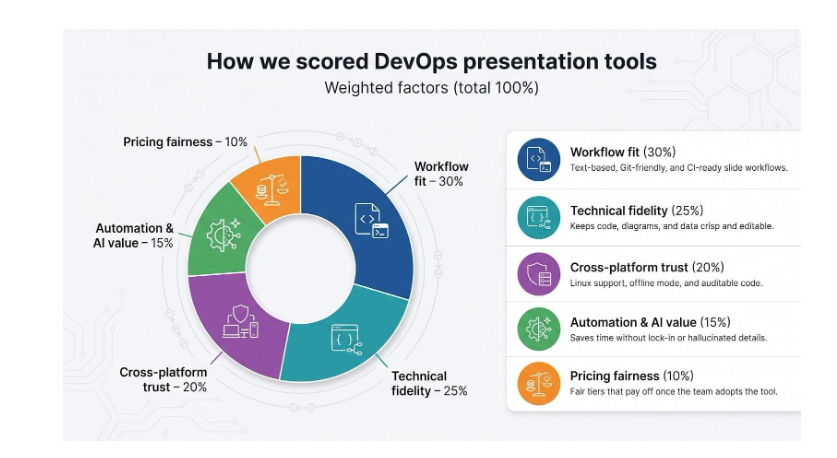
- Workflow fit (30 %)Text-based source files, meaningful Git diffs, and a CLI or API that drops into CI without hacks.
- Technical fidelity (25 %)Crisp code blocks, diagram engines such as Mermaid or PlantUML, and data that stays editable after export.
- Cross-platform trust (20 %)Native Linux support, offline mode, and an open-source or audited codebase.
- Automation & AI value (15 %)Smarts that save time without hallucinating details or locking you into proprietary formats.
- Pricing fairness (10 %)Free tiers for experimentation and paid plans that pay for themselves once the team adopts them.
The final tally produced three clear leaders. An eight-tool comparison grid appears in the appendix, but the next sections focus on the ones that met every requirement and can live in a DevOps pipeline without extra care.
#1 Plus AI: power up Google Slides without switching stacks
Plus AI homepage showing AI presentation maker for Google Slides and PowerPoint
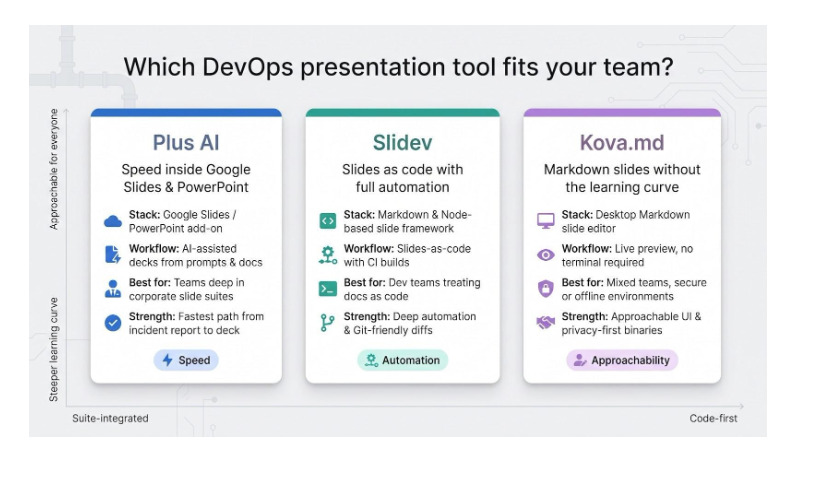
You stay in Google Slides or PowerPoint, open Add-ons → Plus AI, describe your deck in a sentence, and watch fully formatted slides appear in seconds. The workflow goes further: www.plusai.com shows that you can also upload a PDF or Word document and have the AI turn it into fully editable slides, then refine or reformat them with a click.
Plus AI's integration with these platforms allows for seamless transitions between different types of content, making it a versatile tool for professionals.
Why Plus AI tops the list
We picked Plus AI because it removes the “new-tool tax.” You stay in Google Slides or PowerPoint, open Add-ons → Plus AI, describe your deck in a sentence, and watch fully formatted slides appear in seconds. That simple install explains the one-million-plus marketplace installs and 4.6-star rating it holds today.
Speed is only half the value. The add-on understands headings, charts, and imported docs, so an incident report or Confluence page turns into a readable deck faster than you can open a blank template. Because everything happens inside Slides, co-editing, comments, and version history still work, with no awkward exports and no “yet-another-login” fatigue.
Accuracy also matters. AI generators often embellish numbers, but Plus AI keeps humans in the loop. One Reddit reviewer said they spent “almost as long fixing hallucinated stats” in Gamma but ended up back in Google Slides. Our tests match that note: the draft is usually about 85 percent correct, and you can fix the rest with normal Slides editing.
Pricing lands in a friendly zone. A free trial lets teams experiment, then the cost is about $10 per seat once the value is clear. For a DevOps group where each engineer’s time is precious, saving even one sprint retrospective’s prep covers the license.
(Next up: where Plus AI falls short and when to reach for a code-first alternative.)
#2 Slidev: slides as code, built for automation
Why Slidev wins Dev hearts
Slidev feels instantly familiar to anyone who writes Markdown. You separate slides with ---, run npx slidev, and a live-reload browser window springs to life. Each edit in VS Code updates the deck in real time, so your slide workflow finally matches the rest of your coding workflow.
The project isn’t a niche experiment. Since its 2021 launch it has collected 47 k-plus GitHub stars and ships regular releases (latest tag June 2026). That pace shows in the ecosystem; plugins for Mermaid, KaTeX, and Vue components appear almost as fast as you can install them.
Because slides live in text, Git diffs make sense. Peer review works, pull requests catch typos, and CI can build a fresh HTML bundle or PDF on every push. Need a deck for tomorrow’s service review? Point your pipeline at architecture.md, let Slidev render overnight, and walk into the meeting with slides that are literally in sync with main.
Technical fidelity is strong. Code fences keep syntax colouring, Mermaid diagrams stay editable, and you can step through code line by line with built-in directives. No more screenshots, no more blurry exports.
Put simply, Slidev turns presentation into just another artifact your toolchain can build, test, and deploy. For teams that already treat docs as code, that shift is significant.
#3 Kova.md: markdown slides minus the learning curve
Why Kova earns a spot
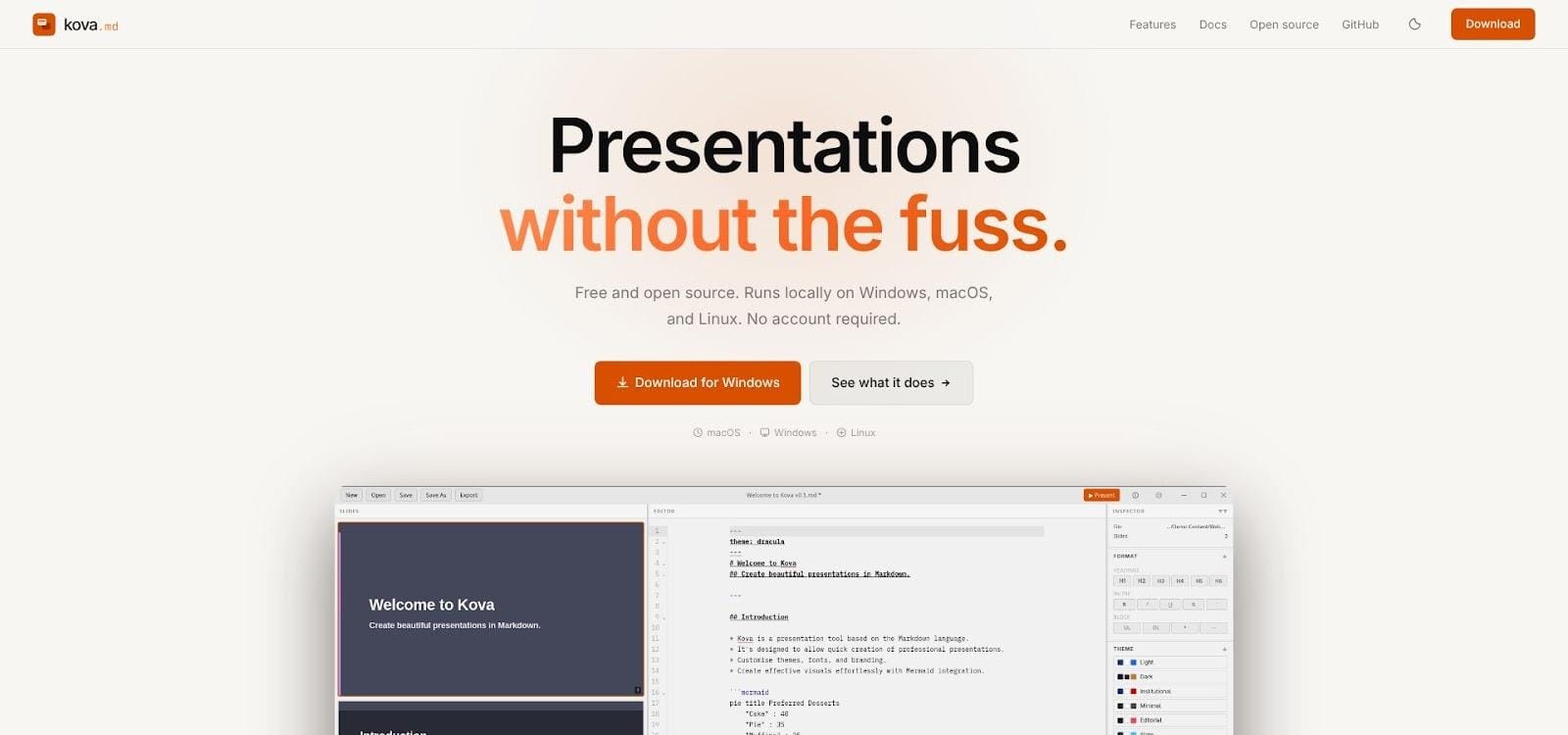
Kova.md homepage showcasing Markdown-powered desktop presentation app
Not every engineer wants to juggle Node installs or Vue components just to make a deck. Kova.md fixes that with a simple desktop app you can hand to the whole team. Open the editor, paste Markdown on the left, and the right pane renders polished slides instantly. No terminal, no setup script; just write, preview, export.
Kova’s auto-layout engine inspects headings, lists, and images, then picks a clean slide layout for each section. You can drop a long-form doc into the app and walk away with a solid presentation in minutes. For internal brown-bags or onboarding sessions, the time savings feel real.
Technical content still shines. Add a Mermaid diagram fence and it renders live. Insert a fenced code block and syntax highlighting appears automatically. Because the deck lives in Markdown, you can commit the file to Git, accept merge requests, and track changes like any other doc. Designers can tweak the exported theme YAML once, and everyone benefits.
Kova is privacy-first. There is no cloud login and no data leaves your machine, ideal for secure environments where SaaS tools are off-limits. Cross-platform binaries for Linux, macOS, and Windows complete the package.
If Plus AI focuses on speed inside corporate suites and Slidev focuses on full automation, Kova focuses on approachability. It brings Markdown efficiency to colleagues who never touch a CLI, closing the gap between dedicated coders and the rest of the organization.